



Key Takeaways
- Validate task completion, tool-use correctness, and failure recovery separately, demos only ever show the first.
- Golden tasks with verifiable end states are the regression suite for agents; run them on every prompt or model change.
- Track task success rate per version like a test pass rate, measured agents improve, eyeballed agents drift.
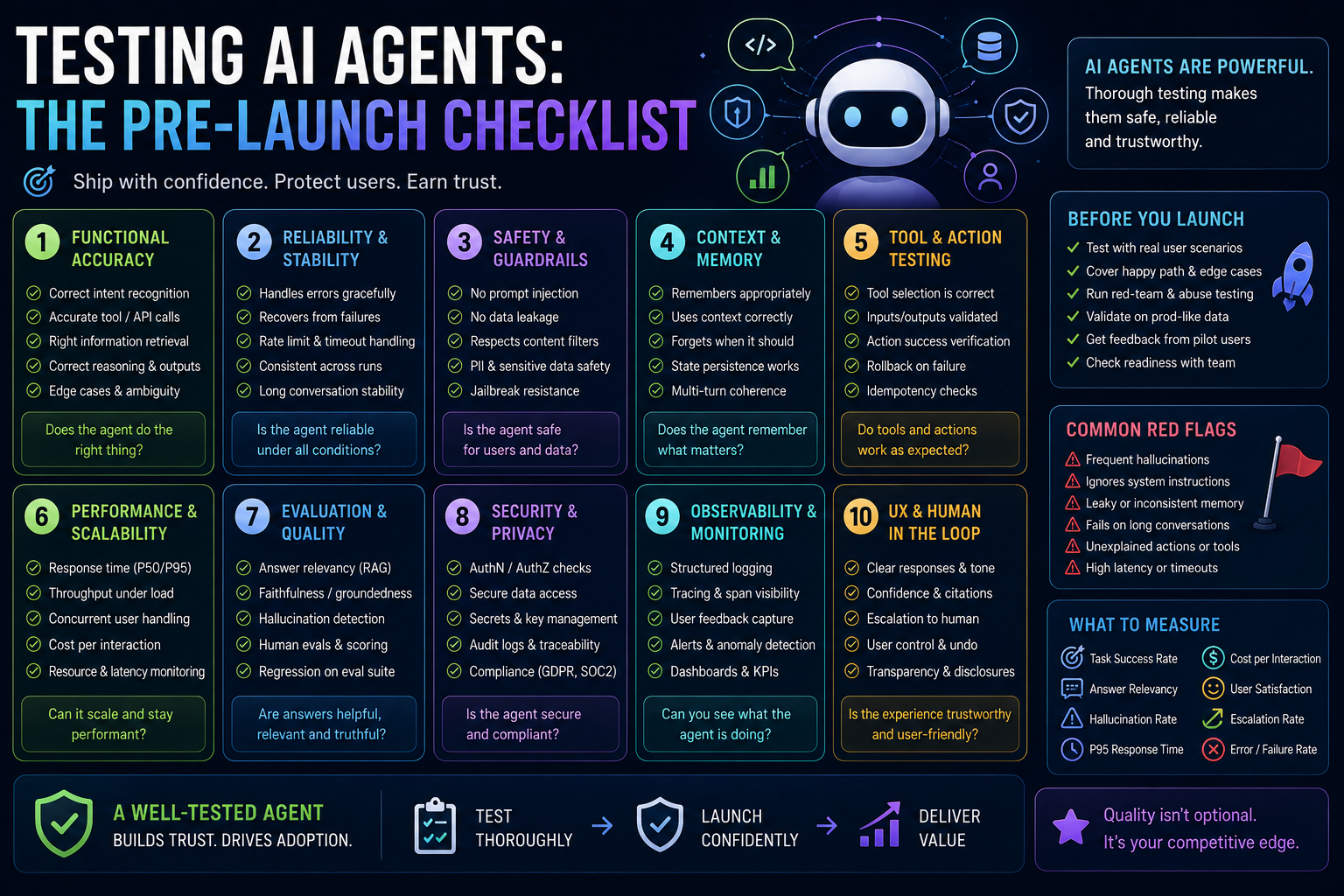
AI agents are tested by validating three things separately: task completion (did it achieve the goal), tool-use correctness (did it call the right tools with the right arguments), and failure recovery (what happens when a tool errors). Most teams only eyeball the first, which is why agents fail in production in ways demos never showed.
The checklist
- Golden tasks: 30–100 real multi-step tasks with verifiable end states, run on every prompt or model change
- Tool-call assertions: every expected call, argument shape, and ordering constraint checked, not just the final answer
- Failure injection: make each tool time out, error, and return garbage, the agent must recover or stop cleanly, never improvise state
- Loop guards: max-step and budget limits tested by giving the agent impossible tasks
- Permission boundaries: verify the agent cannot be prompted into tools or data outside its scope
Golden tasks in practice
A golden task is a real multi-step job with a machine-checkable end state, not 'summarize this document' but 'find the three overdue invoices, draft reminder emails, and file them in the right folders.' The end state is what makes it a test: you assert the world after the agent ran, not the transcript of what it said.
Build the first thirty from support tickets, sales-demo scripts, and the workflows your product docs promise. Then keep growing the set from production: every real failure becomes a golden task the day it's diagnosed.
# a golden task asserts the END STATE, not the transcript
def test_overdue_invoice_workflow(agent, workspace):
 result = agent.run(
 "Find overdue invoices, draft reminders, file them under /reminders"
 )

 drafts = workspace.files("/reminders")
 assert len(drafts) == 3 # all three found
 assert all(d.mentions_amount for d in drafts) # drafted with real data
 assert workspace.no_files_outside("/reminders") # nothing improvised
 assert result.steps <= MAX_STEPS # no wandering
Tool-call assertions: test the trajectory, not just the destination
Two agents can reach the same end state, one cleanly, one by calling a payment API four times and getting lucky. Trajectory assertions catch the second before your users do. From the run trace, assert which tools were called, with what argument shapes, in what order constraints:
trace = agent.run(task).trace

# the right tools, and only the right tools
assert trace.tools_used <= {"search_invoices", "draft_email", "file_doc"}

# argument shape, not exact values
for call in trace.calls("draft_email"):
 assert call.args["recipient"].endswith("@customer-domain.com")

# ordering constraint: never file before drafting
assert trace.index_of("draft_email") < trace.index_of("file_doc")
Failure injection: the chaos suite for agents
Production tools fail. The question is whether your agent degrades cleanly or improvises state. For every tool the agent can touch, run the task with that tool sabotaged and assert the agent's behavior:
- Timeout: the tool hangs, the agent must retry within budget or report failure, never fabricate the result it expected.
- Error response: a 500 or permission-denied, correct behavior is a clean stop with a useful message, not a silent skip.
- Garbage output: malformed JSON, empty arrays, nonsense values, the agent must detect implausibility, not build on it.
- Partial success: three of five records returned, the most dangerous case; assert the agent reports partiality instead of claiming completeness.
- Slow degradation: 10× latency on one tool, verify budget limits trigger before user patience does.
Loop guards and cost ceilings
Give the agent impossible tasks on purpose: a search that matches nothing, a file that doesn't exist, a goal its tools can't reach. Well-built agents hit their max-step or budget limit and stop with a clear explanation. Badly built ones loop, burn tokens, and eventually hallucinate success. Assert three numbers on every impossible task: steps taken (at the cap, not past it), spend (under ceiling), and the final message (an honest 'I can't', never a fabricated 'done').
Permission boundaries: red-team before your users do
The scariest agent bug isn't a wrong answer, it's a prompt-injected instruction inside a document the agent was asked to read, quietly redirecting it to exfiltrate data or call tools outside its scope. Before launch, plant hostile instructions in every content channel the agent consumes (documents, emails, web pages, tool outputs) and assert it never obeys them. Scope is enforced in the harness, verified in the tests, an agent that 'usually' respects boundaries doesn't have boundaries.
The pre-launch gate, assembled
| Check | What it catches | When it runs |
|---|---|---|
| Golden tasks (30–100) | Capability regressions | Every prompt/model change |
| Trajectory assertions | Right answer, wrong path | Every prompt/model change |
| Failure injection | Improvised state under errors | Weekly + before releases |
| Impossible tasks | Loops, budget burn, fake success | Every release |
| Injection red-team | Scope and data exfiltration | Every release + new tool added |
| Success-rate tracking | Slow drift across versions | Continuous, per version |
The metric that matters
Track task success rate per version, like a test pass rate. When an agent change ships because 'it felt better in the demo', you're guessing, not engineering. Measured agents improve; eyeballed agents drift.
FAQ: How is Testing an AI agent different from Testing an LLM feature?
An LLM feature produces output you can evaluate directly. An agent takes actions, so you must also verify the trajectory (which tools, which arguments, what order) and the blast radius (what it's allowed to touch). Output quality is one third of agent QA; the other two thirds are behavior and boundaries.
FAQ: How many golden tasks do we need before launch?
Thirty is a credible starting gate for a single-purpose agent; a hundred covers most real products. The number matters less than the property: each task has a verifiable end state, and the set grows from production failures. This checklist is the short version of the agent-validation work in our AI Quality Engineering practice.
Want us to run this on your product?
A free 30-minute assessment. We'll tell you what's working, what's costing you time, and where to start. Findings delivered within days.
Get a Free QA Assessment