



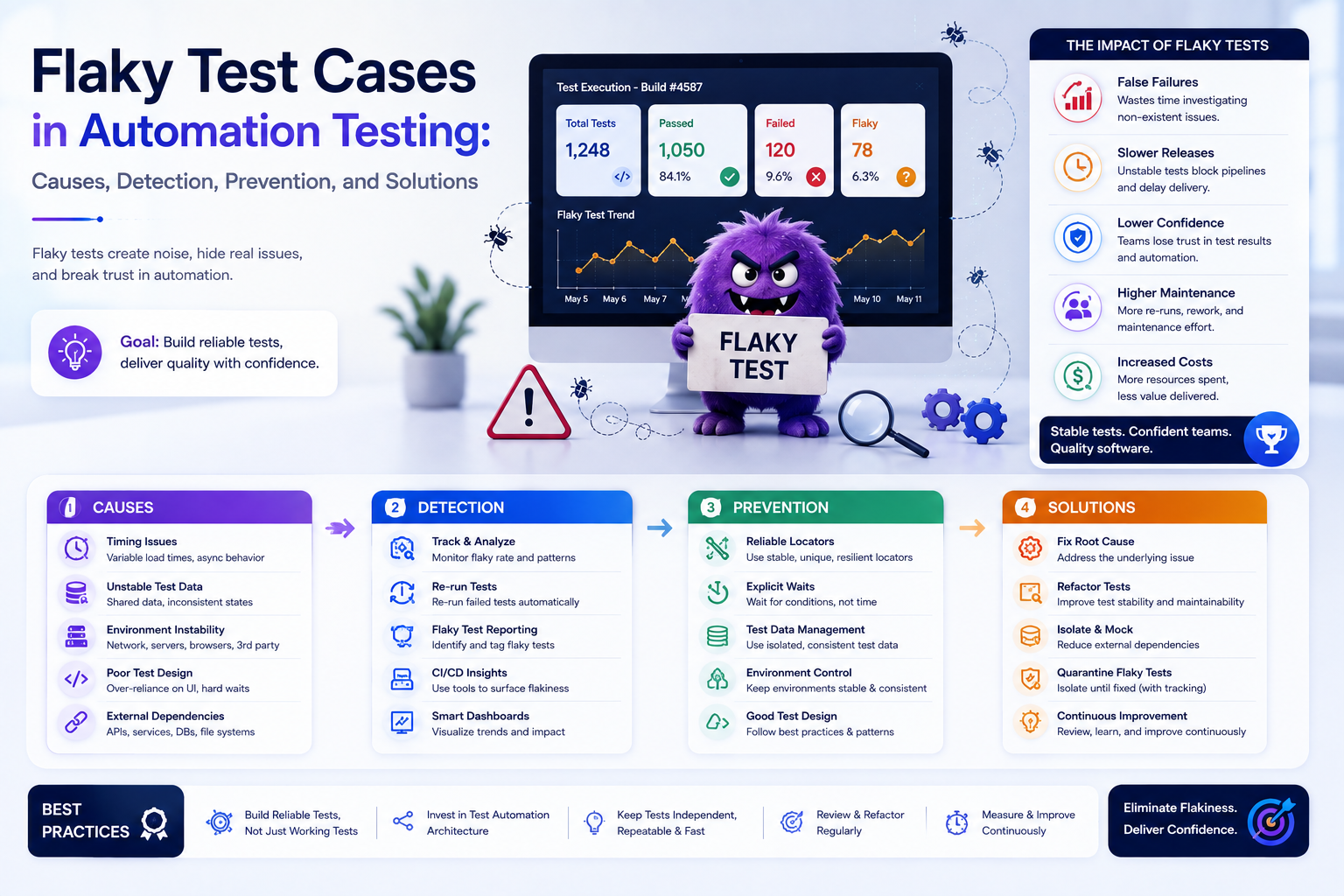
Key Takeaways
- A flaky test passes or fails without code changes, treat it as a defect class, not background noise.
- The big four causes: hardcoded waits, unreliable locators, shared state, and environment drift.
- Explicit waits, mocked dependencies, isolated data, and retry analysis eliminated most of the flake in our own case study.
Software Testing is crucial for delivering high-quality software, ensuring that applications work as expected across various environments. While Automation enhances speed, consistency, and test coverage, flaky test cases can significantly undermine these benefits. A flaky test might pass or fail inconsistently, even without changes to the application or test script, leading to confusion and wasted resources. The classic symptoms:
- Local vs CI/CD Execution: A test runs successfully on a developer's local machine but fails during CI/CD execution due to environmental differences.
- Intermittent Failures: A test fails randomly because of network latency, timing issues, or data inconsistencies, making root causes hard to identify.
- UI Element Detection Issues: A UI Automation test fails on an element not being found but succeeds on re-execution, indicating timing or state issues.
This post covers what flaky tests are, their causes, real-world examples using Java and Selenium, how to detect and prevent them, and how QA Tech Xperts effectively tackled flaky tests in practice.
What Are Flaky Test Cases?
A flaky test is an automated test that passes or fails inconsistently without changes to the underlying codebase. That inconsistency makes it difficult to know whether a failing test indicates a genuine defect in the application or merely the instability of the test itself.
Common Areas Affected by Flakiness
- UI Automation Testing: Tools like Selenium and Cypress are often prone to flaky tests due to timing and state issues.
- API Testing: Tools like REST Assured and Postman can experience flakiness due to network dependencies.
- End-to-End (E2E) Testing: These tests involve multiple components, increasing the likelihood of flake.
Signs That a Test Is Flaky
- Random Failures: Tests that fail inconsistently across multiple runs.
- Environment Discrepancies: Tests that fail in CI/CD but work reliably on local machines.
- Time Sensitivity: Tests whose outcomes vary based on the time of execution.
- Dependency on Other Tests: Tests that pass in isolation but fail when run alongside others.
How to Identify Flaky Tests
- Rerun Tests Multiple Times: Execute tests in quick succession to surface inconsistent results.
- Use Logging and Screenshots: Capture detailed logs and screenshots on failure for analysis.
- Run in Different Environments: Execute tests across local, CI/CD, and cloud setups to spot discrepancies.
- Monitor CI/CD Insights: Use tools like CircleCI, Jenkins, or GitHub Actions to track failure patterns.
Causes of Flaky Tests
- Hardcoded Waits: Methods like Thread.sleep(5000) cause timing mismatches, tests wait too long or not long enough.
- Unreliable Locators: Dynamic element IDs or classes lead to "element not found" errors.
- Poor Assertions: Overly rigid assertions fail on minor UI changes or data variations.
- State Leakage: Tests that modify application state cause unpredictable failures in later tests.
- CI/CD vs Local Differences: Tests that pass locally fail in headless mode due to rendering differences.
- Network Issues: API tests fail intermittently on unstable or slow connections.
- Shared Environments: Parallel runs create resource contention.
- Database Changes: Tests relying on dynamic or shared data yield inconsistent results.
- Session Expiry: Tests depending on auth tokens fail when tokens expire mid-run.
- Test Order Dependency: Tests that modify data inadvertently affect other tests.
- Race Conditions: Parallel tests modifying shared data produce inconsistent results.
- Asynchronous Operations: UI elements that load unpredictably break tests that don't account for them.
- Browser Speed Variations: Rendering-speed differences between CI/CD and local browsers contribute to flake.
Real-World Example: Passes Locally, Fails on CI
Scenario: A Selenium test passes locally but fails in CI/CD (headless mode) due to timing issues with UI elements.
@Test
public void testLogin() {
 WebDriver driver = new ChromeDriver();
 driver.get("https://example.com/login");

 driver.findElement(By.id("username")).sendKeys("testuser");
 driver.findElement(By.id("password")).sendKeys("password123");
 driver.findElement(By.id("loginButton")).click();

 // Fails in CI: element not rendered yet in headless mode
 Assert.assertTrue(
 driver.findElement(By.id("welcomeMessage")).isDisplayed());
}
The fix: implement explicit waits so elements are fully loaded before interaction.
Real-World Example: The Randomly Failing API Test
Scenario: An API test randomly fails due to intermittent network issues.
@Test
public void testApiCall() {
 Response response = RestAssured.get("https://api.example.com/data");

 // Fails intermittently when the server responds slowly
 Assert.assertEquals(response.getStatusCode(), 200);
}
The fix: introduce retry logic to handle transient failures.
The Impact of Flaky Tests
Flaky tests have significant repercussions across the Development lifecycle:
- Delays in CI/CD Pipelines: Inconsistent results hold up deployments and delay critical features.
- Wasted Developer Time: Engineers debug false failures instead of real issues.
- Reduced Trust in Automated Testing: Frequent flake breeds skepticism about the whole suite.
- Increased Maintenance Costs: Maintaining flaky tests consumes resources and drives up Testing costs.
How to Prevent Flaky Tests
- Use Explicit Waits: Replace hardcoded waits with explicit waits (e.g., WebDriverWait) for element presence or visibility.
- Mock External Dependencies: Simulate external APIs and databases to reduce reliance on live systems.
- Ensure Test Data Isolation: Give each test its own data to avoid state conflicts.
- Implement Retry Mechanisms: Add retry logic for operations prone to transient failures.
- Regularly Review and Refactor: Periodically audit the suite to identify and fix flaky tests.
Automating Flaky Test Detection
CI/CD tooling can automate the detection of flaky tests:
- Identify Flaky Tests: CI/CD tools flag tests with inconsistent results over multiple runs.
- Selective Re-runs: Re-run only the tests that failed, not the whole suite, to confirm issues.
- Visualize Failure Patterns: Dashboards reveal trends and support root-cause analysis.
Tools for Managing Flaky Tests
- Selenium Grid: Testing across browser environments, reducing inconsistencies.
- TestNG Retry Analyzer: Automatic retries that separate true failures from flake.
- Cypress & Playwright: Built-in retry logic for unstable UI tests.
Case Study: How QA Tech Xperts Tackled Flaky Tests
The challenges we faced on a real engagement:
- Headless Browser Failures: In CI/CD, tests frequently failed on rendering discrepancies, elements not fully loaded or visible before interaction in headless mode.
- Random API Failures: Tests depending on external APIs failed sporadically on network instability, timeouts, and unexpected status codes.
- Test Data Inconsistencies: Shared test data meant one test modifying a record could break the tests that relied on it.
Solution 1: Replace Hardcoded Waits
The team moved from hardcoded waits (e.g., Thread.sleep()) to explicit waits with Selenium's WebDriverWait class, so tests wait dynamically for the exact condition they need:
WebDriverWait wait = new WebDriverWait(driver, Duration.ofSeconds(10));

WebElement loginButton = wait.until(
 ExpectedConditions.elementToBeClickable(By.id("loginButton")));
loginButton.click();
Solution 2: Mock API Responses
To remove unpredictability from external dependencies, the team mocked APIs with WireMock, simulated responses let tests run in a controlled environment, no live network required:
wireMockServer.stubFor(get(urlEqualTo("/data"))
 .willReturn(aResponse()
 .withStatus(200)
 .withHeader("Content-Type", "application/json")
 .withBody("{\"key\":\"value\"}")));
Solution 3: Parallelize with Selenium Grid
Selenium Grid runs tests in parallel across multiple browser instances, minimizing resource contention and shortening the run:
grid:
 hub:
 host: "localhost"
 port: 4444
 nodes:
 - node:
 host: "localhost"
 port: 5555
 capabilities:
 - browserName: "chrome"
 maxInstances: 5
Solution 4: Isolate Test Data
Each test run gets isolated test data, so shared-data conflicts can't affect outcomes:
@BeforeMethod
public void setUp() {
 database.reset(); // Reset database to a known state
}
The Result
The combination of these initiatives led to a major reduction in flaky tests. Enhanced reliability translated into faster, trusted CI/CD pipelines and quicker releases without compromising quality, proof that flake is a solvable engineering problem, not a fact of life.
Final Thoughts
Flaky tests slow down Development, waste resources, and reduce trust in Automation. By identifying, preventing, and automating flaky test detection, teams can cultivate robust and dependable Test Automation frameworks.
Want us to run this on your product?
A free 30-minute assessment. We'll tell you what's working, what's costing you time, and where to start. Findings delivered within days.
Get a Free QA Assessment