



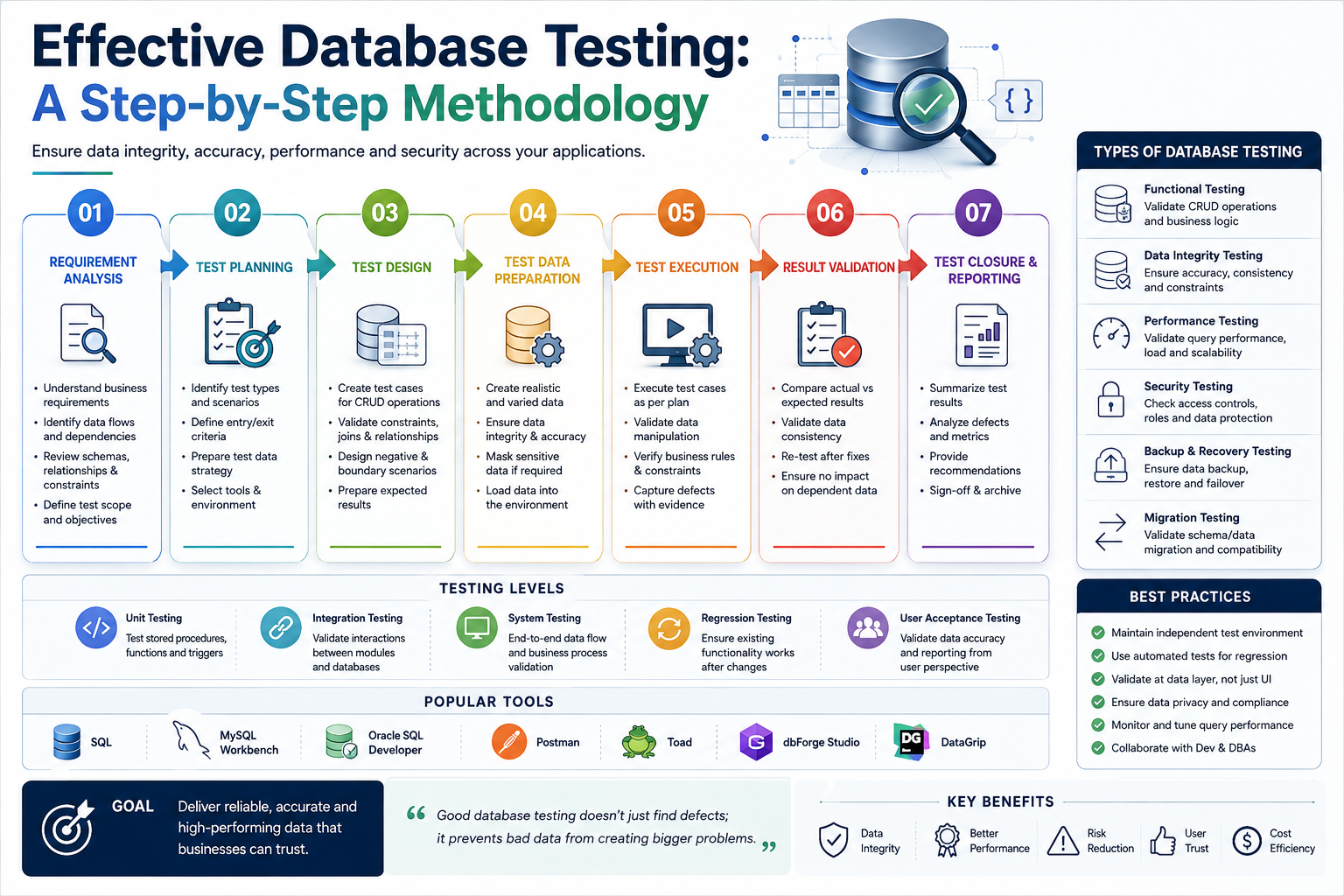
Key Takeaways
- Database Testing splits into five disciplines: structural, functional, performance, security, and data integrity, each with its own tooling.
- CRUD, boundary, and constraint coverage catch the quiet bugs that surface weeks later as corrupted reports.
- Automate schema-change regression first: every alteration demands broad re-validation, and Manual re-runs never keep up.
Database Testing verifies that the data stored in a database is accurate, consistent, and behaves as expected. Before anything else, you need a connection to a disposable test database, for example, in Python:
import MySQLdb

db = MySQLdb.connect(
 host="localhost",
 user="root",
 passwd="password",
 db="testdb",
)
cursor = db.cursor()
The Building Blocks
A quick refresher on the concepts every database test touches:
- Database: A collection of data organized in a structured way, typically in tables with rows and columns.
- RDBMS: Relational database management systems such as MySQL, Oracle, PostgreSQL, SQL Server, and SQLite.
- Tables: Where data is stored.
- Schema: Defines the structure of the database, tables, columns, and relationships.
- SQL: The language used to interact with the database.
The Five Types of Database Testing
- Structural Testing: Verifies the database schema, tables, relationships, and constraints.
- Functional Testing: Ensures the database behaves as expected when the application interacts with it (e.g., CRUD operations).
- Performance Testing: Assesses speed, efficiency, and scalability under different loads.
- Security Testing: Verifies that data is protected from unauthorized access.
- Data Integrity Testing: Ensures data stays consistent, accurate, and reliable across tables and relationships.
Setting Up the Environment
- Install an RDBMS: Set up a local Testing database such as MySQL, PostgreSQL, or SQLite.
- Create test data: Build tables and populate them with representative sample data.
- Wire up connections: Connect the database to your application or Testing tool (JDBC/ODBC or a language driver).
Structural Database Testing
- Schema validation: Verify tables, columns, and relationships match the design.
- Indexes and keys: Ensure primary and foreign keys are set correctly.
- Stored procedures, triggers, and views: Validate their functionality.
- Data types: Confirm each column uses the correct type.
Functional Testing
- CRUD operations: Create (insert), Read (SELECT), Update (modify), and Delete, the four paths every app exercises.
- Boundary conditions: Data at the edge of acceptable ranges, such as max/min string lengths.
- Validations: Input constraints, NULL, unique, and default values.
- Relationships: Foreign keys and cascading actions behave as designed.
- Stored procedures and triggers: Correct results, and the intended actions on insert, update, and delete.
Data Integrity Testing
- Entity integrity: Every row has a unique identifier (usually the primary key).
- Referential integrity: Relationships between tables hold under change.
- Domain integrity: Values fall within acceptable ranges and types are enforced.
- ACID properties: Atomicity, Consistency, Isolation, and Durability under real transactions.
Performance Testing
- Load Testing: Simulate concurrent users at expected volumes.
- Stress Testing: Push beyond normal capacity to find the breaking point.
- Query optimization: Efficient SQL, proper indexing, no full table scans.
Security Testing
- Authentication and authorization: Users hold exactly the permissions they should.
- SQL injection: The application and database reject injection attempts.
- Encryption: Sensitive data (e.g., passwords) is encrypted at rest.
Backup & Recovery
- Full backup/restore: All data can be recovered.
- Incremental backup/restore: Only changed data is backed up, and restores correctly.
Tools Worth Knowing
For Automation: Selenium (functional Testing integrated with databases), Apache JMeter (load), dbUnit (Java unit Testing), and tSQLt (SQL Server).
For management and analysis: SQL Server Profiler, pgAdmin, MySQL Workbench, DBeaver, and JDBC/ODBC for programmatic access.
A Manual Walkthrough (SQL Server)
- Launch SQL Server on the tester's local system.
- Compose SQL in the query analyzer to retrieve the data under test.
- Verify: Compare retrieved data against expected results, looking for discrepancies.
- Manipulate: Insert, update, and delete data to test how the application responds.
The General Testing Procedure
- Configure the environment: Set up the database server to closely resemble production, the closer the match, the fewer false results.
- Execute test cases: Data retrieval tests (correct results for given queries) and data modification tests (updates, deletions, insertions handled correctly).
- Verify results: Check actual output, error messages, and system behavior against expectations.
- Validate pass/fail: Matching output passes; anything else is investigated as a failure.
- Report to stakeholders: Document findings for developers, project managers, and QA.
Focus Areas
- Data integrity: Truthful, precise, comprehensive, retrievable, verifiable data.
- Data mapping: Accurate mapping across tables and relationships.
- ACID evaluation: Robust transaction handling.
- Business rules: The rules implemented in the database do what the business expects.
Automating the Procedure
- Define the scope: Which tables, relationships, and data processes need coverage.
- Develop test scripts: Automated scripts that execute cases and validate outcomes against expected results.
- Prioritize: Automate the most critical test cases first.
- Execute: Retrieval, validation, and modification tests in every run.
- Document and monitor: Record outcomes, watch for patterns (performance drift, response-time spikes), and cross-check against UI test reports.
When Automation Pays Off Most
- Schema changes: Every alteration demands broad re-validation, Automation cuts the cost dramatically.
- Integrity monitoring: Automated checks catch corruption from recovery processes or human error quickly.
- Agile release cadence: With releases every few weeks, automating stable functionality frees testers to focus on what changed.
The One-Page Database Test Plan
If you adopt nothing else from this methodology, adopt the one-pager: for each critical table, list its integrity rules; for each business flow, the queries it depends on; for each schema change, the checks that must re-run. Kept in the repo next to the migrations, reviewed with them, this single document converts database Testing from an occasional heroic effort into a habit tied to the change that needs it.
FAQ: How often should database tests run?
Integrity and CRUD checks belong in CI with every merge that touches the data layer; the full structural suite runs on every migration by definition; performance baselines run nightly against production-shaped volumes, because a query that's fast on 10,000 rows and slow on 10 million is the classic escape.
FAQ: Who owns database Testing, DBA or QA?
Jointly, with a clean seam: QA owns behavior (does the application read and write correctly, do business rules hold), DBAs own the platform (indexes, performance, backup/recovery), and migrations are the shared gate both sign off. The failure mode to avoid is the gap between them, each assuming data integrity is the other's checklist.
Want us to run this on your product?
A free 30-minute assessment. We'll tell you what's working, what's costing you time, and where to start. Findings delivered within days.
Get a Free QA Assessment