



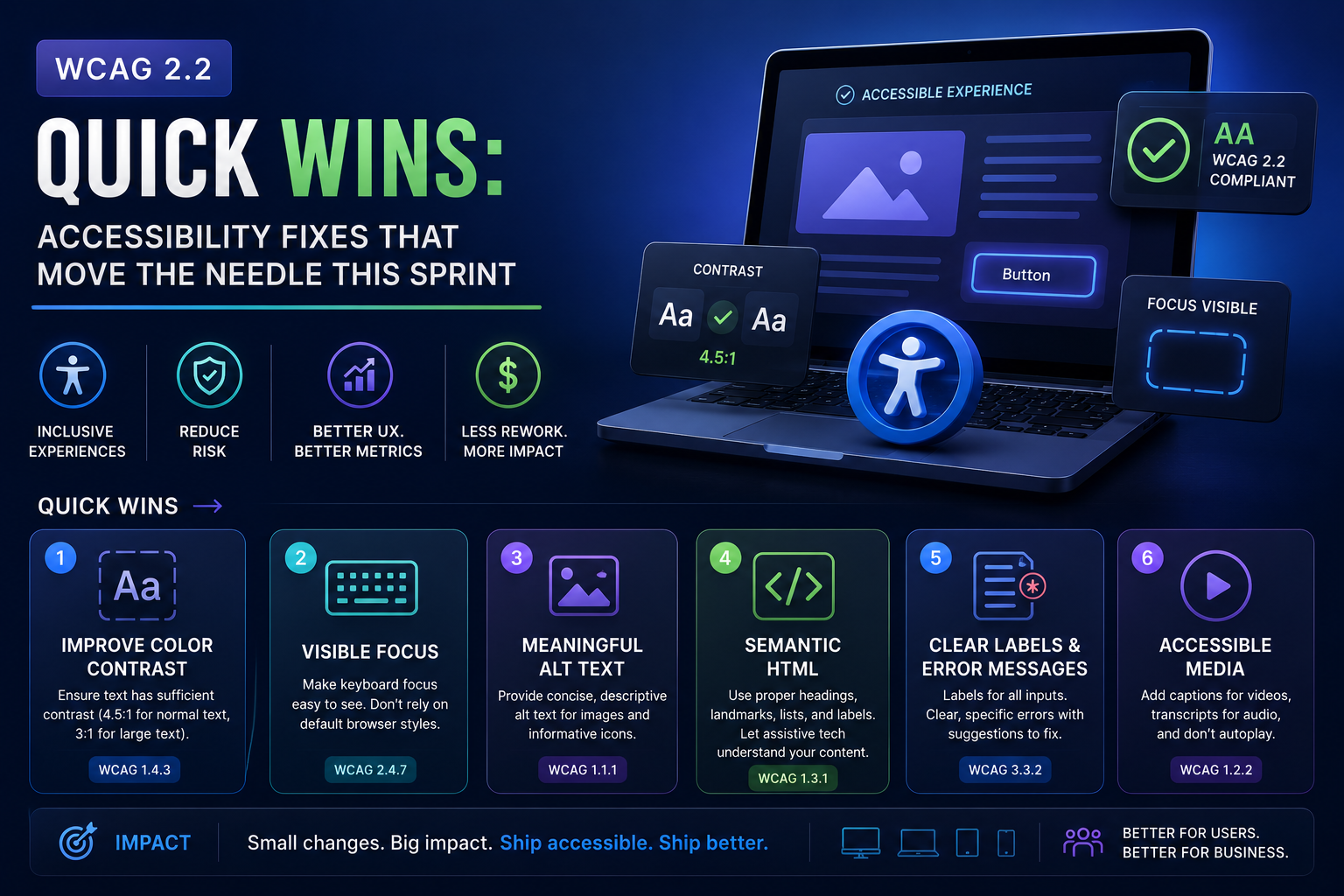
Key Takeaways
- Five issue classes dominate real audits: keyboard traps, invisible focus, unlabeled fields, low contrast, meaningless alt text, all sprint-sized.
- Automated scanners catch under half of real issues; budget one Manual screen-reader pass per release.
- Fix design tokens, not instances, one contrast fix at the token level repairs every page at once.
The fastest path to meaningful WCAG 2.2 progress is fixing five issue classes that dominate real audits: keyboard traps, missing focus indicators, unlabeled form fields, low-contrast text, and images without meaningful alt text. These are sprint-sized fixes with outsized legal and usability impact.
This sprint
- Tab through every critical flow, anywhere focus disappears or gets stuck is a P1
- Make focus visible: WCAG 2.2's strengthened focus-appearance rules are where most sites newly fail
- Label every input programmatically, placeholder text is not a label
- Run a contrast sweep on text and interactive states; fix tokens, not instances
- Alt text that says what the image means, not what it is ('Error state diagram', not 'image1.png')
Then make it stick
Add automated axe checks to CI for regressions, and schedule one Manual screen-reader pass (NVDA or VoiceOver) per release for what scanners can't judge. Automation holds the line; humans set it.
What WCAG 2.2 actually added (and who it protects)
WCAG 2.2 added nine success criteria, and they cluster around two users the previous versions underserved: people navigating by keyboard or switch device, and people with cognitive or motor constraints:
- Focus Appearance and Focus Not Obscured: the focused element must be visibly, clearly indicated, and not hidden behind sticky headers or cookie banners. This is where most previously-compliant sites newly fail.
- Target Size (Minimum): interactive targets need at least 24×24 CSS pixels, a direct hit on icon-button-dense toolbars and dense data tables.
- Dragging Movements: anything achievable by drag needs a non-drag alternative, sliders, kanban boards, and file-drop zones all need buttons too.
- Redundant Entry and Accessible Authentication: stop making users re-type information within a flow, and never gate login on a cognitive test like transcribing a code from an image without alternatives.
- Consistent Help: help mechanisms appear in the same place on every page, trivial to implement, embarrassing to fail.
Engineering the five fixes properly
The quick wins from the checklist above have a right way and a checkbox way. The right way, per fix: keyboard traps die when every interactive component manages focus in and out, test modals, date pickers, and custom dropdowns specifically, because libraries lie. Focus visibility belongs in the design system as a token (:focus-visible with a 2px offset outline), not per-component CSS. Labels mean programmatic association, a <label for> or aria-label, verified by the accessibility tree, not by looking. Contrast fixes go into color tokens so the fix propagates; and alt text is content work, not engineering work, give writers the rule 'describe the purpose, not the pixels' and review it like copy.
Wiring axe into the suite you already have
If you run Playwright, continuous accessibility checking is an afternoon of work, not a project:
import AxeBuilder from "@axe-core/playwright";
import { test, expect } from "@playwright/test";

test("checkout is free of critical a11y violations", async ({ page }) => {
 await page.goto("/checkout");

 const results = await new AxeBuilder({ page })
 .withTags(["wcag2a", "wcag2aa", "wcag22aa"])
 .analyze();

 const critical = results.violations.filter(
 (v) => v.impact === "critical" || v.impact === "serious"
 );
 expect(critical).toEqual([]); // fail the build, with named rules
});
Beyond the sprint: four flows worth a full screen-reader pass
Scanners score pages; users complete journeys. When you schedule that per-release Manual pass, spend it on the flows where failure locks someone out entirely:
- Sign-up and login, including error recovery: a mislabeled error message turns a typo into a dead end.
- Checkout or payment, the flow with legal exposure and revenue attached; test it with keyboard only, then with NVDA.
- Primary search and filtering, announce result counts and state changes, or the page appears to do nothing.
- Account and settings, where focus traps hide in modals, date pickers, and custom dropdowns.
The business case, in one paragraph
Accessibility suits keep rising, WCAG 2.2 is the reference standard courts and procurement teams point to, and enterprise buyers increasingly require a VPAT before signing. But the quieter number matters more: accessible flows are simpler flows, and every fix above, visible focus, real labels, honest error messages, measurably improves conversion for every user, not just the roughly one in six users with a disability (the WHO's global estimate). Compliance is the floor; usability is the payoff.
FAQ: Do we need an accessibility audit or can we self-serve?
Start self-serve: the sprint checklist above plus axe in CI finds the bulk of violations for the cost of a sprint. Bring in an audit when you need evidence, a VPAT for enterprise sales, litigation defense, or certainty before a public-sector bid. The audit's real value is the Manual screen-reader work and the prioritized remediation plan, not the scanner output, which you can and should run yourself, and which our Accessibility Testing practice treats as the floor, not the deliverable.
FAQ: How do we keep a site accessible after the cleanup?
Three mechanisms, in order of leverage: tokens (focus, contrast, and spacing fixed at the design-system level so new pages inherit compliance), CI gates (axe on critical flows, failing on serious violations), and one Manual screen-reader pass per release on the four flows that matter. Teams that rely on annual audits alone re-accumulate violations at roughly the speed they ship.
Want us to run this on your product?
A free 30-minute assessment. We'll tell you what's working, what's costing you time, and where to start. Findings delivered within days.
Get a Free QA Assessment